Pick your test
Find the name from your invitation email. Each page explains the format, how to prepare, and links to a free five-item sampler. If the email only says "Excel assessment", start with the last one.
- Kenexa Prove ItHands-on tasks in a simulated Excel window, Normal User level.
- SHLNo SHL-style mock yet. Use the general employment mock and the function guides today.
- Robert HalfOffice and accounting Excel tasks in a simulated Excel window.
- TestGorillaNo TestGorilla-style mock yet. Use the general employment mock and the function guides today.
- CriteriaNo Criteria-style mock yet. Use the general employment mock and the function guides today.
- MO-200No MO-200-style mock yet. Use the lessons, function guides and the general mock today.
- Interview caseNo interview-case practice yet. Use the lessons, how-to pages and the general mock today.
- Not sure which testNot sure which test you have? A mixed mock that covers the common ground.
We name these tests only to describe what we help you prepare for. We are not affiliated with any of these companies, and every practice item is our own.
What employers actually test
Employer Excel tests are less mysterious than they look. Whatever the brand on the invitation, they draw on the same small set of skills that office work needs every day: putting data in, shaping it so it can be read, and asking it questions. The tests differ far more in format and timing than in what they cover.
At the basic level, expect to move around a sheet, enter and edit values, fill a series, format numbers as currency or percentages, and sort or filter a list. At the intermediate level, the questions shift to formulas: an IF that labels rows, a COUNTIF or SUMIF that summarizes them, and a lookup that pulls a value from another table. Advanced tests and interview cases add cleaning messy data, error handling and PivotTables, and they expect you to work quickly.
Knowing a function and using it correctly under a clock are different skills. Points slip away on small mechanics: typing into the wrong cell, forgetting the dollar signs before filling a formula down, leaving off the FALSE in a VLOOKUP, or running out of time on a task you could do with no clock. That is why we teach by doing, in a grid, rather than with videos.
| Skill area | Typical tasks | Where we teach it |
|---|---|---|
| Data entry and formatting | Enter and edit values, fill a series, apply number and date formats, sort and filter | Excel from Zero |
| Formulas and functions | SUM and AVERAGE, IF, COUNTIF and SUMIF, absolute references, text and date functions | Everyday Excel |
| Lookups and analysis | VLOOKUP, INDEX and MATCH, XLOOKUP, error handling, cleaning data, summary tables | Everyday Excel and Analyst |
How our mocks match the formats
A mock is only useful if it feels like the test you are about to sit. So each mock follows the format of one test: the number of items, whether they are hands-on tasks or multiple choice, the time limit (or the lack of one), and the way the result is scored. Some mocks mix tasks and questions, because some tests do.
We base each mock on the provider's public description of the test where one exists, and we say on the test's page where we had to make a choice, such as the number of items or whether there is a timer. If a provider changes its format, we update the mock.
Every answer is checked automatically the moment you submit. For hands-on tasks, the checker reads the cells you changed, the values and the formulas, so a hard-typed number where a formula belongs does not pass. For untimed formats we still record your pace, so you can see which kinds of task slow you down.
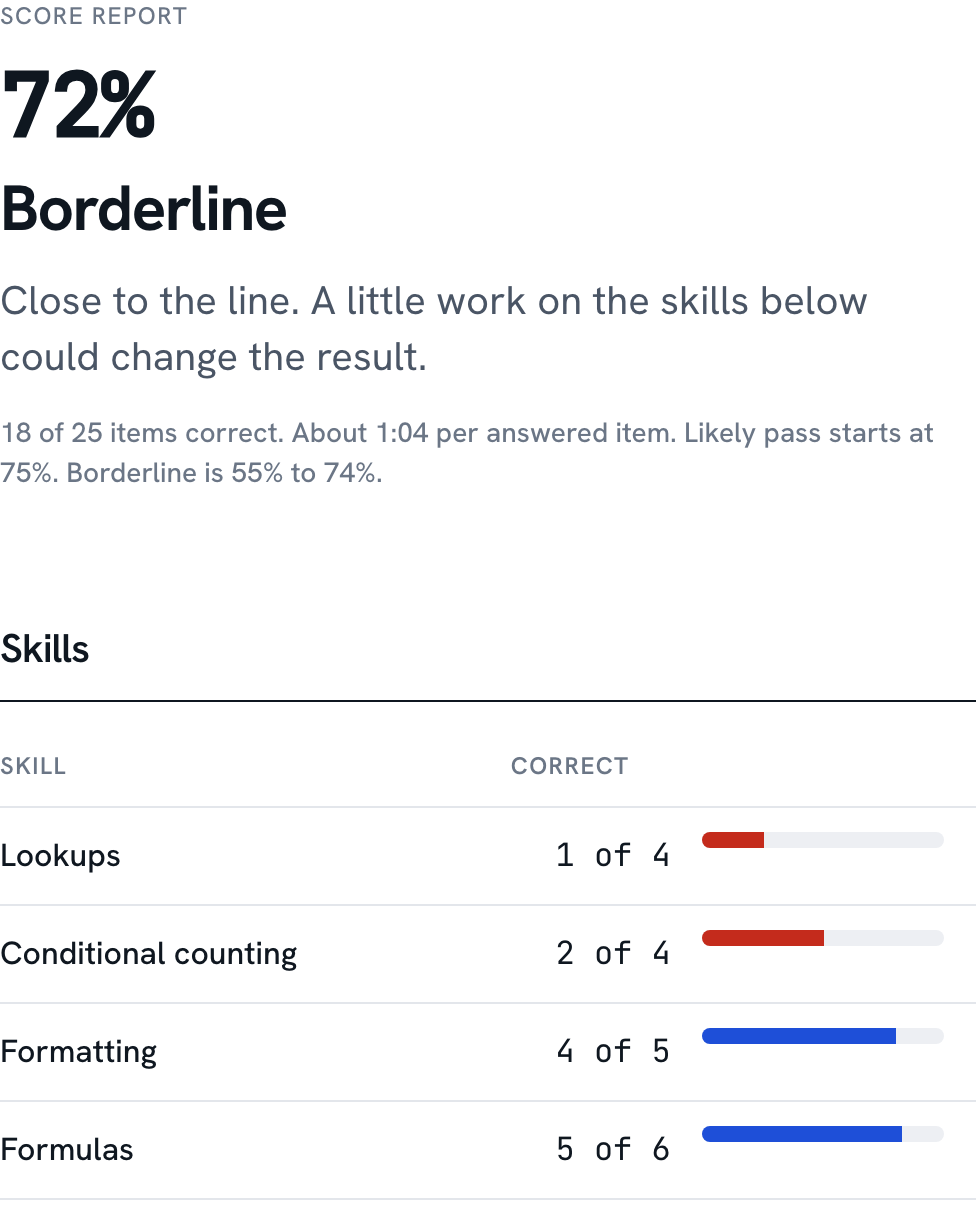
When you finish, the score report breaks your result down by skill area, shows your average time per item, and lists every missed item with an explanation. Each weak area links straight to the lessons that fix it. Retake the mock and you get fresh numbers and a different mix of items in the same format, though some item types come back, so you are testing the skill more than your memory of the answers.
The report also gives you a band: likely pass, borderline, or not yet. That band is our estimate based on our own items. It is there to help you decide whether to drill for another evening or book the test, and it is never a promise about the real thing.
Start with the free sampler
The sampler is five items in the closest format we have, scored like the full mock. It takes about ten minutes and needs no account. If you are not sure which test you have, it is also the quickest way to find out whether you need a week of practice or an evening.
- Pick your test, or answer four questions and let us pick the closest format.
- Work through five items in the practice grid, with the real format's rules.
- Read your report: what you got right, what you missed, and which lessons fix it.
Three formats are live today (Generic employment test, Kenexa / Prove It style, Robert Half style), and each one has its own free sampler. Other test pages on this site explain their format and point to the closest sampler.
The course tracks
A mock tells you where you stand. The tracks are how you move. There are four planned, from opening a spreadsheet for the first time to modeling and interview cases. The beginner track is complete and free. Right now Everyday Excel has 6 of 9 modules published; Analyst has 6 of 8 modules published; Expert is not published yet. Unpublished modules open one at a time, and the track pages say which are live. Every lesson is a short run of hands-on exercises: a one-line instruction, a sheet with data in it, and a check when you press Enter.
Get one wrong and the feedback points at the specific thing that went wrong, with up to three hints if you want them. You can always see the solution; it just earns no points. Excel from Zero is free in full, and the first two lessons of every other module are free too.
If your test is next week, you do not need to work through a track in order. The score report from a mock links to the exact lessons for the skills you missed, so you can drop into the middle of Everyday Excel, fix what needs fixing, and go back to the mock. If you have more time, the tracks build on each other.
- 0Excel from Zero
For people who have never opened a spreadsheet, or opened one and closed it again.
- 1Everyday Excel
Conditional logic, SUMIFS and COUNTIFS, text, dates and lookups: the functions that turn a list into answers.
- 2Analyst
For people who already use VLOOKUP and want INDEX/MATCH, error handling, dynamic arrays and speed.
- 3Expert
Modeling and case work: the long, multi-step tasks some interviews hand you.
Practice that feels like Excel
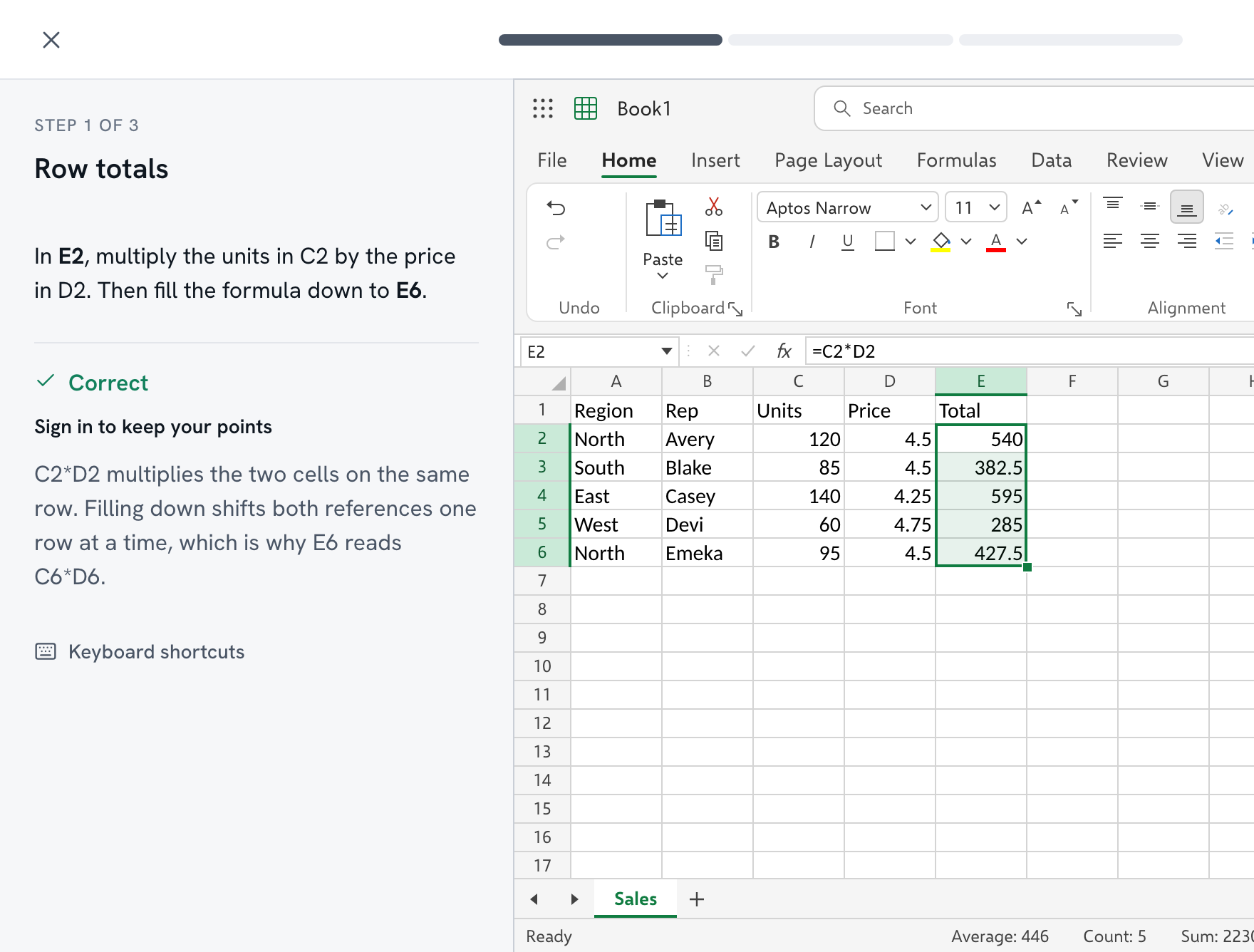
A grid that only looks like a spreadsheet teaches the wrong habits. Ours is built to behave like Windows Excel in the ways tests depend on: how a cell enters edit mode, what Enter and Tab do, how the fill handle copies, and how references shift when you fill a formula down. Every pixel of it is drawn by us, from Microsoft's own documentation of how Excel behaves.
That matters because the hands-on tests are simulations too. If your practice grid accepts a shortcut that Excel would not, or ignores one that Excel would, you build habits that cost you on the day. We would rather you practice slightly slower on something faithful than quickly on something that is not. We test it in Chromium browsers (Chrome and Edge) and in Safari's engine, and it runs on Windows or a Mac.
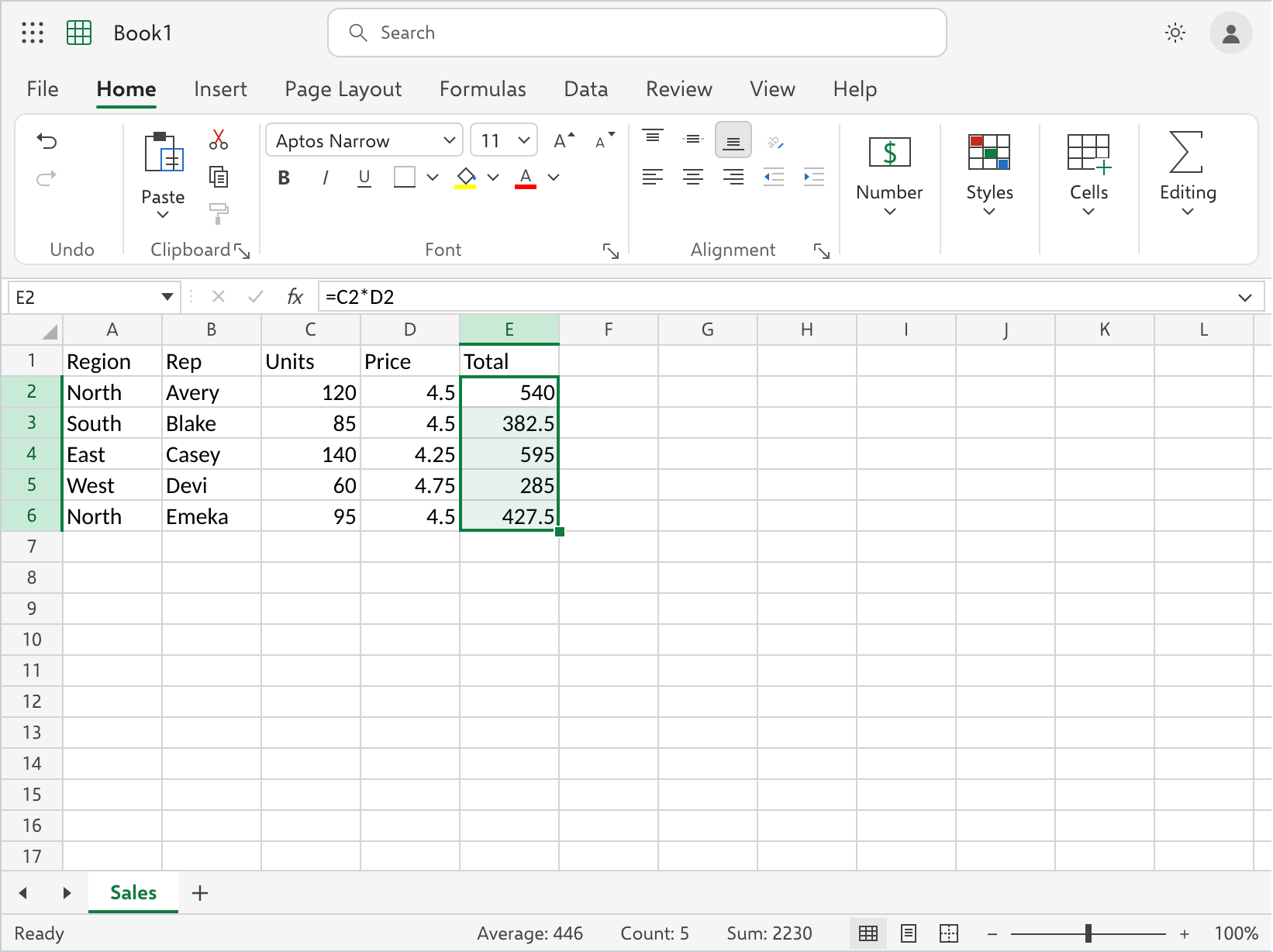
- Formula bar
Type a formula and the formula bar mirrors it, with the cell reference in the Name Box.
- Keyboard
The shortcuts you would use at work behave the same: Ctrl+arrows, F2, F4, Ctrl+D.
- Check
Press Check and the task is graded on the cell contents, not on which buttons you clicked. Keyboard-speed lessons also check that you used the shortcut.
A reason to come back tomorrow
Every exercise earns points, and practicing on consecutive days earns a streak. Both sit in the corner of the lesson player, and points stay provisional until our server has replayed your work and agreed with the result.
None of this is the point; passing your test is. But practice is easier to keep up when there is a number going up, and a streak is a decent nudge to do ten minutes tonight instead of none. Daily and weekly leaderboards and a daily challenge are planned for a later release, and we would rather tell you that than show you a board with nobody on it.
Pricing in one line
Free to start. 30-Day Pass $29. Annual $79.
The pass is one payment for a test that is coming up soon; nothing renews. The annual plan suits people building skills over time. The free tier includes the full beginner track and a sampler for every published test format, so you can find out whether this helps before you pay anything. There is no monthly subscription to remember to cancel. See what each plan includes.
Questions
Are these the real test questions?
No. Every task and question here is written by us. We copy the format of each test (how many items, what type, how long, how it is scored) and never the content. If a site offers you the actual questions, be wary of it.
Which Excel test is my employer using?
Check the invitation email for a provider name, or ask the recruiter; many will tell you the provider and the level. If you still do not know, our test picker asks four short questions and suggests the closest format.
How long should I practice before the test?
It depends on the gap. Take the free sampler first; it shows which skill areas you missed. If it is two or three areas, a few focused evenings usually covers it. If you are starting from zero, begin with the free beginner track.
Do I need Excel installed?
No. Everything runs in your browser. Hands-on practice needs a laptop or desktop with a keyboard; on a phone you can read lessons and answer multiple-choice questions.
Is this Windows Excel or Mac Excel?
Windows Excel, Microsoft 365 version, because that is what most employer tests simulate. It runs fine on a Mac in Chrome, Edge or Safari. Shortcuts follow Windows, and our shortcuts page lists the Mac keys next to each one.
What is free and what is paid?
The beginner track, the first two lessons of every other module, one sampler per published test format, and the function guides are free. Full Access unlocks every published lesson, every full mock, and saved score reports.
Is the score a prediction of my real result?
No. The report shows likely pass, borderline or not yet, and that is our estimate based on our items, not the provider's scoring. Use it to decide what to practice next, not as a promise.
Is this affiliated with Microsoft or any test provider?
No. We are independent. We name tests only to describe what we help you prepare for, and the full disclaimer is at the bottom of every page.
Your test date is set. Your practice can start today.
Ten minutes, five items, no account. You will know what to work on before you close the tab.